
Disclaimer: This tool is a Proof of Concept (PoC).
Europe is currently starting to rotate towards Linux and less american software in general, meaning that a lot of new Linux users are going to be exposed to a lot of new threats, ransomware being one of the most common and dangerous ones. I wanted to create a tool that could help protect these new users from ransomware attacks, and I thought that using eBPF would be a great way to do it. Obviously, this is not a complete solution, but it is a good starting point for anyone interested in learning how to use eBPF for security purposes.
What is eBPF? #
eBPF (extended Berkeley Packet Filter) is a powerful technology that allows you to run custom code in the Linux kernel without needing to modify the kernel itself. It provides a safe and efficient way to monitor and manipulate system behavior in real-time. This makes it an ideal tool for creating security solutions like an anti-ransomware. With eBPF, we can hook into various kernel events, such as file operations, and analyze them to detect and block suspicious activity. However it is important to note that eBPF has some limitations, such as a limited instruction set and strict safety checks, which can make it challenging to implement complex logic. Despite these challenges, eBPF offers a powerful and flexible platform for building security tools that can help protect Linux users from ransomware and other threats.
Knowing that, we can divide the project into two parts: the eBPF program that will run in the kernel and monitor file operations, and the user-space program that will load the eBPF program and handle the logic for blocking suspicious activity, the last part is known as a daemon.
The logic behind the anti-ransomware #
The main idea of this project is to not use any kind of signature, meaning we actually need to flag a process as malicious to kill it. To do that, we need to find something that characterizes ransomware, and the most obvious one is the fact that ransomware encrypts files. Thus, we need to monitor writing operations on files, and if we detect a process that is writing gibberish data, we can flag it as malicious and kill it. But how can our program know if the data being written is non-sense or not ? Well, there is something called entropy that can be used to measure the randomness of data, and it is commonly used in cryptography to measure the strength of encryption. The idea is that if a process is writing data with high entropy, it is likely that it is encrypting files, and thus we can flag it as malicious.
So now, our program is able to detect a suspicious process, but we still need to find a way to block it. The funniest way to do that is to simply kill the process, but that comes with a big problem:
How do we differentiate a malicious process from a legitimate one that is just writing random data (like a compressor for example) ?
Well, in the real world, this will be a problem, and there is no perfect solution to it, but for the sake of this project, we build a simple whitelist of processes that are allowed to write high entropy data. This whitelist is generated at build-time, taking all binaries from /usr/bin, /usr/sbin, /snap/bin…, and thus allowing all legitimate processes to write high entropy data without being flagged as malicious. This is not a perfect solution, but it is a good starting point for this project.
(To upgrade this without it becoming a real EDR solution, we could add a system of reputation for processes, that would add points to a process each time it writes high entropy data, and remove points each amount of time, and if a process reaches a certain threshold of points, it would be flagged as malicious and killed. This way, we could allow some false positives without killing legitimate processes, while still being able to block malicious ones. But this is not a perfect answer either, and it is out of the scope of this project, so I will not implement it for now)
But what happens if a process is flagged, killed and restarted ?!
We need to add a blacklist as well, storing all the processes that have been flagged as malicious, and if a process is in the blacklist, it will be killed immediately without being allowed to write any data. This way, even if a process is restarted, it will still be blocked from writing data.
Ok ! We got most of the idea, now, it is time to go to war !
The eBPF program #
First of all, we need to gather every binary and library we need, and i will not explain how to get them since I made it automatic if you build the project.
How do we make the eBPF talk to the daemon ? As i was saying before, eBPF has a limit of ressource and on top of that, this is still a program that is not allowed to sleep. Without a daemon user-space, we would need to do all the entropy checks, blacklist and whitelist check in an incredible narrow window to make sure that we don’t slow the system. We can see that this is really hard, and fortunatly, we don’t have to. eBPF has a system of shared memory, allowing us to communicate with a process in user-space (our daemon).
What information will we send to the daemon then ? We need to send the process id (PID), the thread group id (TGID), the file descriptor (FD), the current name of the command (comm), the size of the data being written and the program inode. With this information, the daemon will be able to do all the checks and decide if the process is malicious or not. Of course, we can not send all the data being written to the daemon, since it can be really big, but we can read a chunk of 512 bytes (the size of a memory page) and send it to the daemon to calculate the entropy. This way, we can have a good estimation of the entropy without sending too much data to the daemon. We will take the middle of the data being written to make sure we are not sending only the header of the file, which can be really similar for different files and thus not giving us a good estimation of the entropy.
Now, we hook the syscall sys_enter_write ! This syscall is called each time a process is writing data to a file, and it is the perfect place to hook to monitor file operations.
However, if we leave it like that, we just monitor write operations, but it means that every write operation will be monitored, even the ones that are done by a whitelisted process, and thus we will be doing a lot of useless work. To avoid that, we need to do the check inside the ePBF program and only send the information to the daemon if the process is not whitelisted. This way, we can avoid doing a lot of useless work and only monitor the processes that are not whitelisted.
To do that, we can declare a map in eBPF that will store the whitelist, and we can check if the process is in the whitelist before sending the information to the daemon. This way, we can avoid doing a lot of useless work and only monitor the processes that are not whitelisted.
We will also need to declare a map for the blacklist, to store the processes that have been flagged as malicious, and if a process is in the blacklist, we will kill it immediately without sending any information to the daemon.
#define MAX_ENTRIES 10240

struct {
__uint(type, BPF_MAP_TYPE_HASH);
__uint(max_entries, MAX_ENTRIES);
__type(key, __u64);
__type(value, __u8);
} *whitelist* SEC(".maps");

struct {
__uint(type, BPF_MAP_TYPE_HASH);
__uint(max_entries, MAX_ENTRIES);
__type(key, __u64);
__type(value, __u8);
} *blacklist* SEC(".maps");
As seen in the code snippet above, we declare two maps, one for the whitelist and one for the blacklist, both of type BPF_MAP_TYPE_HASH, with a maximum of 10240 entries, and with a key of type __u64 (the inode) and a value of type __u8 (useless data).
Why a hashmap with the inode as a key ? Because the inode is a unique identifier for a file in the filesystem, and it is not possible for two different files to have the same inode. This way, we can be sure that we are whitelisting or blacklisting the correct file, even if there are multiple copies of the same file in the system.
Why a hashmap with a useless value ? Because we just need to check if the file is in the whitelist or in the blacklist, we don’t need to store any additional information, and thus we can just store a useless value to save space.
Now, we can just check the inode of the current process is in the whitelist or in the blacklist, and if it is in the whitelist, we do nothing, if it is in the blacklist, we kill the process immediately, and if it is not in either of them, we send the information to the daemon to do the checks and decide if the process is malicious or not.
Nice, now time for the user-space !
The daemon #
This is where all the logic happens, this is where we calculate the entropy, check the whitelist and the blacklist, and decide if a process is malicious or not. This is also where we will add a lot of features in the future, like the reputation system that I was talking about before.
For now, here is a list of what we need to do in the daemon:
- Load the eBPF program and get data from it.
- Calculate the entropy of the data received and react accordingly.
- Update the whitelist hashmap from the file
whitelist.txt, and the blacklist hashmap from the fileblacklist.txt.
Load the eBPF #
First of all, we use the command bpftool gen skeleton, it will generate a header file that we will use to load the eBPF program. This header file contains a function that will load the eBPF program and return a pointer to it, and it also contains the definitions of the maps that we declared in the eBPF program, so we can use them in the daemon.
To gather the data sent by the eBPF program, we will use the ring buffer. It contains a buffer of 512 char. We use ring_buffer__new(), so that when a new buffer is sent through the ring buffer, we catch it and send it to the function entropy_calculus. But how do we wait for a new entry ? We will use epoll which will tell us when the ring buffer has sent new data.
Now, the daemon will wait for an update from our eBPF program !
Calculate the entropy #
To flag a malicious process, we need to give our anti-ransomware a way to detect them ! To do that, we will use the power of mathematics. Thanks to Mr Shannon, we have an equation to calculate the entropy of a list of numbers. With the hexadecimal char we give to the function, it should return a float number between 0 and 8. The closest it is to 8, the more probable it is that this process is encrypting datas. Thus, we need to take the equation :
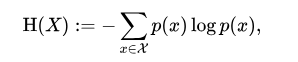
Unfortunatly, I am not keen of equation and my little brain is made for computer code and not demon language, but i found the equivalent in C code !
And now, our daemon is computing the data that the eBPF program sends to know if the process we are looking at is a malicious one or not ! We just have to add a check after the function that checks if the value returned by the calculate_shannon_entropy function is higher than a certain number (7.3 in our case), and if so, adds the malicous process’s inode to blacklist.txt.
Update hashmaps #
To make sure our anti-ransomware is always up to date, we need to add the content of whitelist.txt and blacklist.txt everytime we launch it. In top of that, we need to make sure that everytime one of those two list is updated, we can update the hashmaps accordingly. To do that, we will use epoll again, however, we need it to tells us when these files have changed. To do that, we won’t use epoll in the first place, we will use inotify, a kernel subsystem that monitors changes to the filesystem for us. We will use it to send a notification when one file has been updated, then epoll will watch over inotify so that when we get a notification, it stops sleeping to update the list that has been changed.
Testing with a ransomware ! #
Yes. To be certain that the anti-ransomware is working, we need to let lose a ransomware. Of course, i will not use a real one, but make a safe one, we don’t want to lose everything because of one test !
To prove the project is working, we need a program that writes into files with high entropy. We will just use /dev/urandom and write the output into a file, let’s do it !
int main()
{
    FILE *fd = fopen("/dev/urandom", "r");
    int count = 0;
    char buf[4096];

    if (!fd) {
        printf("Can't open urandom\n");
        return -1;
    }

    count = fread(buf, 4096, 1, fd);
    fclose(fd);
    printf("I've read the random data I need, now, i'll write it !\n");
    if (count) {
        fd = fopen("safe_test.txt", "w");
        fwrite(buf, 4096, 1, fd);
        printf("Written ! This means that I am not dead !\n");
    }
    fclose(fd);
}
Let’s launch the eBPF protector !
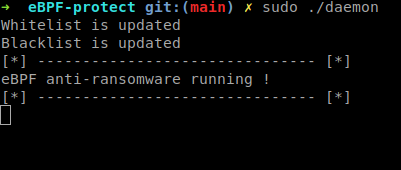
We can see that the daemon has updated the blacklist map and the whitelist map. It took what where in both .txt file and put it into the corresponding hashmap.
Now we need to start the ransomware.
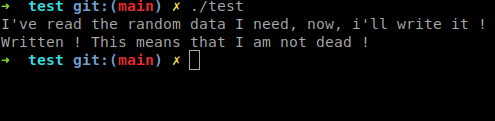
But the ransomware worked ! Well, it’s because of the architecture of our anti-ransomware. Because we use eBPF, we can not sleep, meaning that we give the data to the user-space daemon, but we don’t stop the writing, and thus, the file has been effectively encrypted.
However, it is a the lesser evil.
After the write, our daemon reacted as quick as possible, killing the process, but it was already dead.
Yet, let’s look at our daemon’s logs:
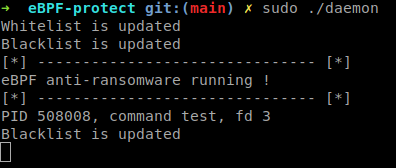
It worked ! The ransomware is now in the blacklist.txt, meaning that it will not be able to perform any other write before being killed.
We sacrified one file to save thousands
Let’s try another time !
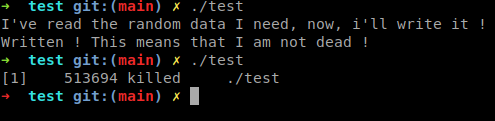
We can see that the ransomware has been shut down immediatly.
The point of this detector is not to erase the ransomware before execution, that is what a regular EDR would do. The detector is just making sure that if a ransomware has passed through your security, it will not be able to perform a full system encryption.
There is a lot of improvement to do to make this detector a usable security program, but it uses cool tools and has all the basic we need. It was my first blue-team oriented project for this blog and I hope you found it as fun as i did !